
Wedding DJ Lighting Without Strobes: A Columbus Planning Guide
By Christopher “DJ iShine” Summers · iShine Music Production

A wedding dance floor can look festive with steady color and warm room light. If you need to avoid strobe or flashing effects, tell the DJ, venue, and photo team early. Ask what each controls, agree on the exact effects to leave out, and check the room with the people who will operate it.
For a Columbus wedding, the plan should cover the whole evening. A DJ might control dance lights, the venue might control ceiling fixtures, and another vendor might run a photo booth or a video display. An instruction to one person answers only the part of the setup they manage.
Describe the lighting experience you want
Use clear terms when talking to the DJ. “We want steady color and no programmed flashes or strobes from the DJ lights” gives a specific direction. If you also want dance lights to stay off, or you prefer no bright effects pointed into the guest area, say so. Ask the vendor to describe the settings they can use and confirm what is included.
The Epilepsy Foundation explains that certain flashing lights and visual patterns can trigger seizures for some people with photosensitive epilepsy. A wedding lighting plan can set practical boundaries based on the preferences people share. It cannot determine an individual’s medical needs. Epilepsy Foundation guidance on photosensitivity.
Ask who controls each type of light
Walk through the event with the venue and planner. Ask who manages house lighting, decorative uplights, dance lights, any programmed displays, and photo equipment. For each, identify a contact who can confirm its settings. Share the same description of the lighting plan with everyone.
The venue can tell you which fixtures are part of the building and which settings the event team can choose. The DJ can describe the lights included in their equipment. A photographer, photo booth attendant, or other vendor can explain how their equipment will be used. Emergency systems remain under the venue’s procedures. Review how different wedding lighting choices change a room.
Choose a visual style that suits your room
A steady warm wash, a small set of fixed uplight colors, or the venue’s existing room lighting can give the dance floor a distinct feel. Ask which fixtures can hold a fixed look and where they would be placed. Colors that look subtle on one surface may appear stronger against reflective walls or draping.
Pay attention to how color and brightness affect guest comfort. Talk about whether you want the lights directed at walls instead of faces, how much light people need to move through the space, and whether a quieter seating area is available. The room and people in it should drive the design. Plan a wedding DJ setup with clear sightlines and paths.
Include moments beyond open dancing
Think through entrances, the first dance, a video toast, and the last song. Ask whether a vendor has planned an effect for any of those moments. If the venue uses a preset or another provider supplies a spotlight, ask them to describe it. The couple can approve a look that applies to each activity.
If the reception includes a screen, preview any chosen video for visual effects before submitting the final file. Ask about photo flash or any booth effects as part of a separate conversation. The photo team can explain what it can provide under your preferences. Ask your planner to confirm the approved plan in one place so everyone has the same information.
Give the team a chance to check the room
Ask for the final lighting preference to be visible on the copy of the timeline that vendors use. If an activity has a different approved look, mark when it starts and ends and who controls it. A written cue helps when a team member changes rooms or joins after the initial walkthrough.
Schedule a short review before guests enter. Use the lighting setting intended for the dance floor and check what it looks like at tables and guest paths. If the venue will change its lights between dinner and dancing, review both levels if possible. A preview gives the vendors a chance to agree on how to get the look they described.
Ask the operator to explain which scenes will be used and how they will move between them. If someone else can access the controls, make sure they have the same instructions. The planner can note who confirmed the setup and who should be contacted if a guest raises a concern.
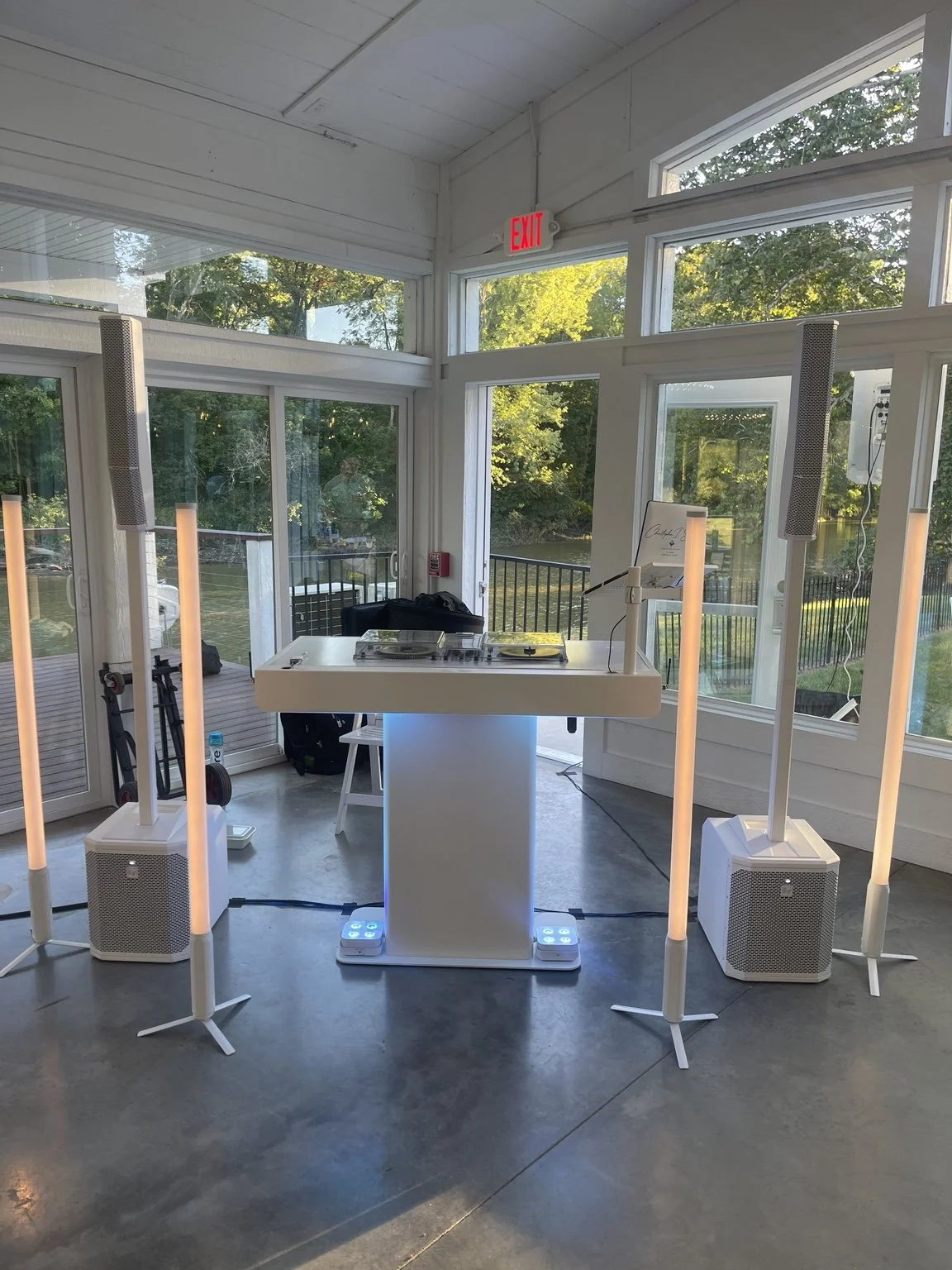
Make guest communication private and simple
You can ask a guest what would help them feel comfortable without asking them to disclose a diagnosis. Tell them what visual effects the vendors have agreed to use and who they can contact with concerns. Let that person choose how they want to participate. If you want to send a general note about the room or lighting, ask how the guest would prefer the information to be shared.
The vendor still needs practical instructions. “Use a steady warm wash and leave any flashing modes off” gives the team something to do without identifying the guest who asked. Make sure the planner, venue, and DJ know who can approve adjustments and how to communicate with that person discreetly.
Prepare an option if a concern comes up
Agree who receives requests about the room and who can make changes. A planner may be able to check with a lighting operator quickly while the DJ continues music. If an adjustment is needed, use the preset you reviewed or ask the venue to confirm an appropriate change. Guests should have a way to move to a comfortable area if they need it.
Review the task before the evening starts. An operator who arrives after setup should still receive the approved settings. A second vendor should know which lights belong to them and how their choices fit the room. A clear contact makes it easier to address a problem before it affects the next scheduled moment.
A hypothetical steady-light reception in Central Ohio
Imagine a couple who wants a reception room in Hilliard to feel warm during dinner and lively during dancing. They choose steady amber uplighting and ask the DJ to skip programmed flashing scenes. The venue keeps the paths around the dance floor well lit. The photographer discusses lighting preferences with the couple and agrees on an approach for the first dance.
The planner checks the settings with each operator before doors open. A guest who asks about the lighting can hear what the team agreed on without being singled out. The reception still has movement and energy from the music, guests, and planned transitions. The couple gets a look they chose and the vendors know how to deliver their part.
A short lighting review for couples and planners
- Specify the effects you want to avoid and the look you prefer.
- Identify the operator for each fixture, display, and photo setup.
- Review the settings for dinner, entrances, dancing, and scheduled effects.
- Confirm brightness, paths, and any quiet seating area with the venue.
- Ask when the team can check the room with the actual settings.
- Choose a contact for guest concerns and day-of changes.
I’m Christopher “DJ iShine” Summers. I review the lighting and music plan with the couple and event team. If you want steady lighting for your Columbus wedding, share your preferences and the venue’s setup so we can discuss a look that fits. Explore iShine uplighting options.